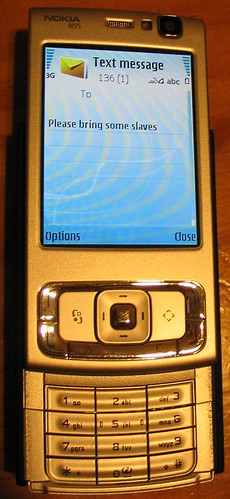
 I wrote about this ages ago, but it hasn’t changed, as it still works the same way on my newish Nokia N95 phone:
The predictive text, which usually works really well, reckons if you press 752737, the most likely word you want is slaves. I always want plates.
So if I’m not careful to change it (using * ), my message could end up saying something like Could you bring some slaves to the picnic?
Without wanting to make too many assumptions, are there many people out there who would be more likely to be texting about slaves than plates?
Other than that the N95 is good. The camera is fantastic — it’s actually slightly more megapixels than my old Canon A70 camera, though the quality isn’t as good, especially in low-light situations.
I love that it has Wifi so I can check my email at home for free without even turning a computer on, or on-the-go via the airwaves, though I confess I haven’t figured out yet how to send an email from it.
Oh, but there was something else: on my old phone the date/time of an SMS was the sent time. On this it’s the received time. So if I turn on my phone after a few hours of it being off, I have no idea how old the messages arriving really are.
That’s the only annoying thing. Apart from the slaves.

22 replies on “You’re invited — bring a slave”
Do you really not have a computer on all the time? Mine goes on first thing in the morning and it’s the last thing that goes off at night.
Recently I changed phone brands from Nokia to LG. After a couple of months I’m tempted to slip my SIM back in to the Nokia, the LG makes too many basic operations too fiddly.
It’s not on quite all the time, and perhaps more significantly, we have two computers but three people in the house!
What does the LG think of plates vs slaves?
Hi Dan,
My SE mobile does the same thing with the SMS date/time stamp, showing the delivery time… I have to check the message details to find out when it was sent. Only a small hassle I guess.
Oh, and careful not to abbreviate “equipment” to “equip” with predictive text too!!
RC
‘I found a slave in the cupboard this morning’.
I wonder if they all license the same technology?
@ Tony. You turn your computer off? Never.
Good and home. I am much more likely to want home but it always defaults to good.
Doesn’t everyone eat their roast beef dinner (with Yorkshire puddings and gravy) off the stomach of their slaves…? :P
If you want to find out when an SMS was sent, find the ‘Details’ menu item. It works for me.
Plus, I find it annoying too when I try to type ‘have’, only to get ‘hate’ as the preferred word.
MK, not on my N95. “Details” tells me received time of the msg only, not sent time.
No one has mentioned the iphone yet in these phone related comments, an error I shall now correct.
Iphone.
that is all.
Pfffttt, you don’t catch me with an I-Phone or an I-anything. :) Good trusty Motorola Razr. With plat entered in it’s offering me platform in predicting what I want to say. LOL, this is fun, guessing what the phone will think you want to say.
I’ll have to dig out my N95 – I’m sure it showed me the sent time somewhere.
I have, ofcourse, since moved to a Google Dev Phone 1 (HTC) handset and everything is completely different again.
Daniel,
Check what your software version is :
Simply type *#0000# on the keyboard and you will get a screen similar to this
V 31.0.017
16-12-08
RM-159
(C) Nokia N95 (02.01)
On this version I -do- get to see (in the “Messaging” – “Sent” folder)
all “Options”, “Message details” like :
subject:
date:
time:
type:
to:
But beware when upgrading your s/w, you will loose all your settings and have to
restore a backup previously stored on you PC. It is not a task for the faint-hearted.
The down side of the lastest versions is thaht the Mapping software does no longer allow FREE speechless Navigation :)
Regards, Estee
Thanks Estee. Looks like mine is an older version, perhaps due to what the phone operator is issuing (it’s got their enhancements in it).
V 20.2.011
13-05-08
RM-160
(c) Nokia N95 (G6.03)
But to clarify: the problem is not the Sent folder. It’s the incoming messages. They tell you the time the message was received, not the time it was sent — which can be quite different if the message was originally sent when the phone was off. Is that different on your N95?
Hey we’re phone twins!
Daniel,
I just tried receiving a text from an Operator here in The Netherlands to a Vodafone number.
I switched off the N95 for a few minutes at 15:23, then sent a text to it .
When I switched on the N95 again at 15:26 it beeped for a new message received. The details on the receiving end showed 15:22 as the sent time.
My conclusion is that it may be either the f/w or the operator settings that cause your phone imperfection. Good luck.
The Dummy Guide to the N95 E-mail setup
First :
Menu -> Messaging -> (Options) -> Settings > E-mail -> Mailboxes.
New mailbox.-> A wizard guides you through IMAP4 or POP3
Then :
Menu -> Tools -> Settings -> Connection -> Access Points
make sure you have your home WiFi in here too.
Lastly :
Menu -> Messaging -> New Message -> E-mail.
When ready select the Acces-Point of your choice for sending it off
On my mobile the word “meal” comes out as “neck” on the first attempt.
When I first met my now wife, I texted an old friend to say what we’d enjoyed a really nice “neck” overlooking the Thames! This – to say the least – came as a bit of a surprise.
The only other example I can recall came from telling another friend by text that we’d enjoyed a tour of Dublin on an “open top cup”……
Thanks Estee. I checked the firmware; for this specific N95, it seems v20.2.011 is in fact the latest. It may relate to the operator being behind in updating, I suppose.
I’ll check my email settings. I think at the time I bumbled my way through it I skipped (or got wrong) the bit about outgoing mail server.
Ian: Ha!
Are you really typing 752737? On my Samsung whateveritis, it’s 752837 (and it still does slaves)…
While we’re on the subject, try typing “smirnoff” into predictive text. Oh, how I laughed at the particularly suitable malatextism.
Trish: Whoops, good catch!
I agree wholeheartedly. I do appreciate that the phones let you add words to the dictionary, but i have yet to find a way to remove built-in words from it. There are some words i’m never going to want to use, but i haven’t figured out how to remove them.
On another note, the phone that i use, a Sumsung…something. If i enter 2337 the default word is ADDS, and BEEP is about #5, but if i enter the same 2337 later in the message, while ADDS is still #1, BEEP is now #2, so there is at least a little ‘intelligence’ built into the phone…
stine